DTF gangsheet builder: Streamline print jobs for efficiency
DTF gangsheet builder is transforming how print shops approach multi-design orders, delivering speed and precision that keep up with demand. In today’s fast-paced apparel industry, efficiency matters as much as quality, especially when managing numerous designs, colorways, and SKUs. By bundling several transfers onto a single sheet, this workflow reduces setup time, minimizes material waste, and streamlines the entire DTF printing workflow. A smart gangsheet approach enables consistent color management and predictable turnarounds across print jobs. This guide explains how a DTF gangsheet builder works, why it matters, and how to leverage it to optimize your DTF sheet layout and overall production optimization.
Beyond the exact term, teams can think in terms of multi-design sheet planning, batch transfer strategies, and streamlined layout workflows. A batch approach supports gangsheet printing efficiency, coordinating design blocks and margins so you can run larger jobs with fewer setup steps. Practically, it means coordinating file prep, margins, bleed, and color management across designs to maintain consistency in DTF printing. Adopting this approach supports DTF production optimization by reducing waste and accelerating throughput, while keeping quality intact.
DTF gangsheet builder: Streamlining print jobs with efficient gangsheet printing and optimized DTF sheet layout
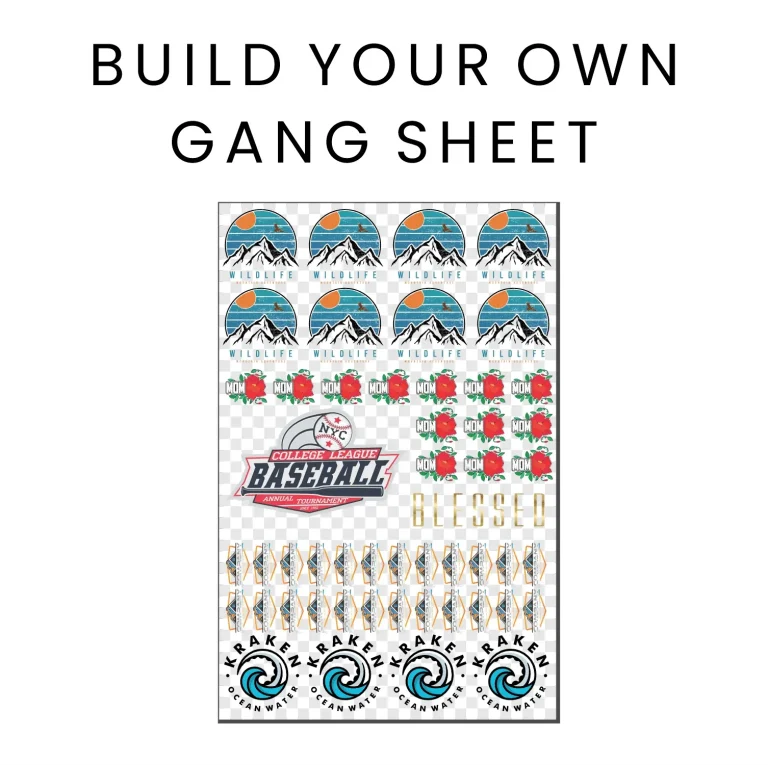
A DTF gangsheet builder is a software or workflow tool that arranges multiple transfer designs on a single DTF sheet before printing. This approach capitalizes on gangsheet printing to maximize sheet real estate, taking margins, bleed, and safe areas into account so you can produce many transfer sheets from one print run. By consolidating designs into a single, print-ready file, you streamline the DTF printing workflow and improve consistency across jobs while maintaining color fidelity and print quality.
Implementing a robust DTF sheet layout within a gangsheet builder directly impacts your end-to-end print jobs. You’ll see faster setup times, reduced material waste, and cleaner handoffs from file prep to post-processing. The result is a more predictable production rhythm where design discrepancies are caught early, color management stays locked, and operations align around a single, well-defined gangsheet that guides the entire run.
DTF printing workflow optimization: Maximizing efficiency through strategic gangsheet printing and enhanced DTF production optimization
To optimize your DTF printing workflow, start with design readiness, precise sheet layout planning, and rigorous color management. A well-structured gangsheet printer strategy ensures consistent output, making it easier to calibrate inks and transfer parameters across all included designs. By aligning file exports, bleed, and safe zones, you minimize reprints and ensure each design prints true to specification, which is essential for scalable production.
Advanced tips focus on end-to-end optimization: integrate the gangsheet tool with your RIP or printer software to reduce handoffs, standardize color profiles across designs, and maintain a single source of truth for all press settings. With a strong emphasis on DTF production optimization, you can measure throughput, waste reduction, and color consistency to drive continuous improvements—ultimately delivering reliable, high-quality transfers at faster turnarounds.
Frequently Asked Questions
What is a DTF gangsheet builder and how does it optimize the DTF printing workflow?
A DTF gangsheet builder is a software tool that arranges multiple transfer designs on a single DTF sheet to enable gangsheet printing. By grid-planning the DTF sheet layout with proper margins, bleed, and safe zones, it speeds up print jobs and streamlines the DTF printing workflow. This approach improves DT F production optimization by batching designs for the same run and delivering consistent color management across designs.
What are the best practices for using a DTF gangsheet builder to maximize efficiency in gangsheet printing and print jobs?
Start by gathering designs and specs, then decide a sheet size and margins. Import designs into the gangsheet builder and arrange them with consistent spacing. Add bleed and safety zones, configure color profiles, and preview the layout before exporting print-ready files. Run a test print to verify alignment and color fidelity, then refine layouts based on results. Following these DTF sheet layout and production optimization practices helps ensure efficient print jobs and a streamlined DTF production workflow.
| Aspect | Key Point |
|---|---|
| Challenge | Efficiency is essential in a fast-paced apparel printing landscape; bottlenecks arise when managing multiple designs, colorways, and SKUs, leading to repetitive setup and printing. |
| Solution | A DTF gangsheet builder groups several designs onto a single DTF sheet, dramatically reducing setup time and material waste. |
| Benefits | Significant reductions in setup time and material waste, enabling faster throughput without sacrificing quality. |
| Workflow | Supports a smart gangsheet printing workflow that turns complex, multi-design orders into streamlined production runs. |
| Guide Focus | Explores how a DTF gangsheet builder works, why it matters, and how to use it from file prep to final output. |
Summary
Conclusion: The DTF gangsheet builder emerges as a strategic enabler for modern apparel print shops, transforming chaotic multi-design orders into organized, efficient production runs. By consolidating designs on one sheet, it minimizes setup steps, reduces waste, and preserves color fidelity, delivering consistent results across batches. Practitioners who adopt a robust gangsheet approach can expect faster turnarounds, lower material costs, and improved predictability in production timing, positioning their operations to scale with demand while maintaining high quality. Embracing the DTF gangsheet builder as a core workflow component helps you stay competitive in the evolving landscape of direct-to-film printing.